

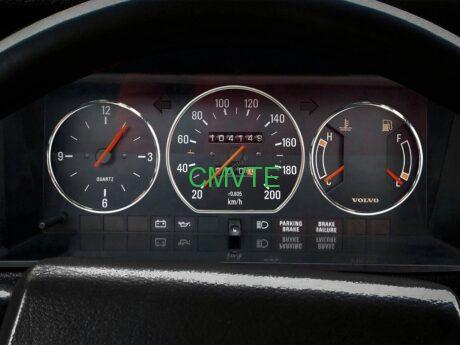

Step 1: Ensure compatibility with EV system and vintage electrics
The 240/740/940 lack a modern CAN bus network, so the smart dashboard must work with your conversion's core EV components without straining the original 12V wiring.
⚡ EV system integration
- BMS & motor controller sync: The dash needs data from BMS and motor controller. For low‑voltage DC motor setups, choose a dash with analog inputs; for HV AC, pick one supporting basic CAN. Many converters find choosing the right communication protocol for their volvo 240 digital dash is key to accurate data.
- Avoid overly complex systems: Skip dashes designed for modern EVs – they require complex wiring the 240/740/940 can't handle. Instead, choose "EV dashboards for classics" like Dakota Digital VHX or AEM X‑Series, which simplify integration.
🔌 Vintage wiring compatibility
- 12V only: 240/740/940 low‑volt systems run at 12V – dash must accept 12V input. Most retrofit smart dashes do, but always check specs.
- Minimal wiring changes: Look for units reusing original harness. Dakota Digital VHX connects to the 240's stock speedo cable via digital adapter, no new gearbox wiring. If you're dealing with volvo 240 dashboard lights, plug‑and‑play design simplifies installation.
Step 2: Focus on critical EV data – skip the gimmicks
Classic Volvo owners value function over flash, so the smart dash should display key EV info without ruining the minimalist cockpit.
📊 Must‑have core metrics
- Battery status: real‑time SoC, range estimate, pack voltage, cell temps. For LFP packs, ±2% accuracy is ideal – avoid vague "low/med/high" indicators.
- Motor performance: power/torque, motor temp, regen level. DC setups usually get data from controller analog output; AC via CAN.
- Auxiliary system health: DC‑DC output status, 12V aux battery level – 240/740/940 still use a small 12V battery for contactors/accessories.
- Preserve original ambiance: Many want their volvo 240 digital dash to blend with factory lighting. Choose dimmable displays so volvo 240 dashboard lights are legible but not harsh at night.
🎯 Skip the gimmicks
Avoid dashes with Apple CarPlay, GPS nav, or ambient lighting – they need extra power and wiring, clashing with 240's clean interior. Stick to "data‑first" designs that look like a natural upgrade, not a tech intrusion.
Step 3: Ensure physical fit – match the factory dash opening
240/740/940 have unique dash dimensions – a smart dash too large will need cutting vintage plastic, too small leaves ugly gaps. Measure carefully before buying.
📏 Size & shape
240/740/940 dash opening: original cluster sits in a rectangle: 240 approx 18cm x 10cm, 740/940 20cm x 11cm. Choose smart dashes matching these. Examples:
- 240: Dakota Digital VHX‑240 fits perfectly using stock mounting screws.
- 740/940: AEM X‑Series Compact Dash fills the opening without cutting, retaining curved edges.
Depth matters: space behind the 240/740/940 dash is limited. Avoid dashes thicker than 5cm – too deep will hit windshield or require internal frame mods.
🎨 Retro aesthetic alignment
- Analog‑style displays: To keep classic vibe, choose smart dashes with "virtual analog" gauges, not full digital grids. Dakota Digital VHX uses LED‑backlit virtual dials mimicking 240's orange backlight – perfect retro charm. This volvo 240 digital dash design feels modern yet classic.
- Minimalist design: Avoid high‑contrast screens that glare. Choose matte‑finish displays with adjustable brightness – dim at night to match original 240 dash lights and prevent windshield reflection.
Step 4: Assess ease of installation – critical for DIY converters
Most 240/740/940 conversions are home‑built, so the smart dash should install without professional tools or programming.
🔧 Plug‑and‑play adapters
Dashes like Dakota Digital VHX come with harnesses made for 240/740/940 – no cutting or soldering. Adapters plug into factory cluster connectors, then into the new dash, cutting install time to 2‑3 hours. For first‑timers dealing with volvo 240 dashboard lights, this avoids common wiring mistakes.
📁 Pre‑configured EV templates
Some dashes have built‑in EV templates – just enter battery capacity and motor power, and the dash auto‑calibrates range and power display. No manual programming – great for novice converters.
📘 Clear documentation support
Choose brands with detailed guides for classic Volvos. Dakota Digital has step‑by‑step 240 install videos showing how to remove the original cluster and fit the new one – crucial for avoiding damage to fragile vintage plastic.
Step 5: Prioritise durability for year‑round driving
240/740/940 are often daily drivers, so the smart dash must handle extreme temps and occasional moisture.
🌡️ Temperature range
Look for dashes rated -30°C to 70°C. AEM X‑Series works reliably in that range – essential for winter cold and summer heat.
💧 Moisture resistance
240/740/940 door seals age and may let in rain. Choose at least IP54 rating. Dakota Digital VHX has a sealed bezel preventing moisture ingress, avoiding shorts.
☀️ Anti‑glare screen
The large windshield of classic Volvos catches sun, so an anti‑glare screen is needed. Matte finishes reduce reflections – glare can make digital displays unreadable on sunny days. Adjust volvo 240 dashboard lights brightness and angle for all‑day clarity.
✅ Final selection checklist for your Volvo 240/740/940 EV conversion
- Confirm compatibility: match your EV setup (analog/CAN) and 12V vintage wiring.
- Focus on critical data: ensure battery status, motor performance, auxiliary health are shown – skip gimmicks.
- Check physical dimensions: match 240/740/940 dash opening (approx 18x10cm / 20x11cm), depth ≤5cm.
- Choose easy installation: plug‑and-play harnesses, pre‑configured EV templates, clear documentation.
- Verify durability: wide temperature range, moisture resistance (IP54+), anti‑glare screen.
❓ FAQ – smart dashboard for Volvo 240/740/940
Can I keep my original Volvo dashboard and just add a small display?
Yes, some converters add a secondary display (like a 5" screen) mounted in a custom pod or in the ashtray slot. However, integration may look less clean. Full replacement dashes (Dakota Digital, AEM) give a factory‑fit appearance and display all EV data in one place.
Will a smart dashboard work with my existing speedometer cable?
Most smart dashes for classics use the original speed sensor – either cable (with a digital adapter) or a wheel speed sensor. Dakota Digital VHX includes a sender that replaces the cable's connection to the transmission, so the original cable stays unused.
How do I wire the dashboard to show battery state of charge?
You'll need a signal from your BMS. Many BMS units (like Orion, Daly) have CAN or analog outputs. Choose a dash that accepts the same protocol. For CAN, you may need to configure the IDs; for analog, you calibrate the dash to 0‑5V representing 0‑100% SoC.
What if my EV conversion uses a 72V system – does the dash need 72V power?
No – the dash itself runs on 12V from your auxiliary battery. It only reads data from the HV system via sensors or CAN. It does not draw power from the main traction pack.
Are there any plug‑and‑play dashboards specifically for the 240?
Yes, Dakota Digital makes a direct‑fit VHX series for the 240 (part# VHX‑240). It comes with custom harness and bezel that matches the 240's curves, including programmable shift lights and EV data pages.
How do I make the volvo 240 dashboard lights dim properly at night?
Modern smart dashes have built‑in photocells for auto‑dimming, or you can wire them to the original headlight switch dimmer circuit. Check if the dash supports external dimmer input – many do.
By focusing on compatibility, retro charm, and user‑friendliness, you'll choose a smart dashboard that enhances your Volvo 240/740/940 EV conversion – keeping the classic soul while delivering modern data for confident driving. Whether you're upgrading an original volvo 240 dashboard, configuring a volvo 240 digital dash, or fine‑tuning volvo 240 dashboard lights, this guide helps you make the right choice. 🇸🇪

