

As an EV communication test engineer, have you ever been confused when you saw the byte order option in DBC? Are you confused by the concepts of “LSB”, “MSB” and “cross-byte signal”? Don’t memorize “positive reading and negative reading”! This article will systematically disassemble the essential differences between Intel and Motorola formats through clear illustrations and practical cases, so that you can see the transmission mystery at a glance when you see the DBC signal layout next time!
- What are LSB and MSB
- LSB (Least Significant Bit)-The bit with the least weight in a binary number.
- MSB (Most Significant Bit)-The most significant bit in a binary number.
Key understanding: From the byte field of the standard UART data transmission format in the figure below, it can be clearly seen that LSB and MSB only represent two bits, which describe the bit weight relationship within a value, and do not specify the transmission order or physical storage position of the bit of the value in the byte or message! The transmit/deposit order is defined by the byte order (Intel/Motorola).

LSB and MSB are bit weight concepts within a numeric value
- Intel format
Core tip: LSB at the low bit of the low byte, MSB at the high bit of the high byte
Scenario a: Signal does not span bytes
- Signal layout:The signal is completely contained in one Byte (Byte 1).
- Read Rule:
- The LSB is at Bit 0 (least significant bit) of Byte 1.
- The MSB is at Bit 7 (most significant bit) of Byte 1.
- Read order:In Byte 1, read from Bit 0 (LSB) to Bit 7 (MSB).
Example binary value: 0100 0110 (hexadecimal: 0x46)

Scenario B: Signal across bytes
- Signal layout:a 16-bit signal starting at Bit 0 of Byte 4 and ending at Bit 7 of Byte 5.
- Read Rule:
- The LSB (starting point of the signal) is at Bit 0 (lower bit of the low byte) of Byte 4.
- The MSB (end of signal) is at Bit 7 (higher bit of high byte) of Byte 5.
- Read order:
Read the part of the signal in the low byte (Byte 4) first: start from the start bit Bit 0 and read to the highest bit Bit 7 of the byte.
The portion of the signal in the high byte (Byte 5) is then read, starting with the lowest bit of the byte, Bit 0, and ending with the end bit, Bit 7.
Example binary value: 0100 0110 (Bit0-Bit7 from Byte 5) + 1001 0111 (Bit0-Bit7 from Byte 4) = 0100 0110 1001 0111 (hex: 0 x4697)

- Motorola format (big-endian mode)
Core tip: LSB in the low bit of t
he high byte, MSB in the high bit of the low byte
Scenario a: Signal does not span bytes
- Signal layout:The signal is completely contained in one Byte (Byte 1).
- Read Rule:
- The LSB is at Bit 0 (least significant bit) of Byte 1.
- The MSB is at Bit 7 (most significant bit) of Byte 1.
- Read order:In Byte 3, read from Bit 0 (LSB) to Bit 7 (MSB).
Example binary value: 0100 0110 (hexadecimal: 0x46)

Scenario B: Signal across bytes
- Signal layout:a 16-bit signal starting at Bit 0 of Byte 5 and ending at Bit 7 of Byte 4.
- Read Rule:
- The LSB (starting point of the signal) is at Bit 0 (lower bit of the high byte) of Byte 5.
- The MSB (end of the signal) is at Bit 7 (the higher bit of the low byte) of Byte 4.
- Read order:
Read the part of the signal in the high byte (Byte 5) first: start from the start bit Bit 0 (LSB) and read to the highest bit Bit 7 of the byte.
The part of the signal in the low byte (Byte 4) is then read, starting from the lowest bit of the byte, Bit 0, to the end bit, Bit 7 (MSB).
Example binary values: 0100 0110 (Bit0-Bit7 from Byte 4) + 1001 0111 (Bit0-Bit7 from Byte 5) = 0100 0110 1001 0111 (hex: 0 x4697)

Core differentiation visualization: Memory byte alignment
Although the binary value read is the same 01000110 the 10010111 (0x4697), the physical placement of the data in memory is vastly different!
- Motorola :
- Byte 4 (memory low address): 0100 0110 (0x46, upper 8 bits/value upper bit)
- Byte 5 (memory high address): 1001 0111 (0x97, lower 8 bits/value lower)
- Intel :
- Byte 4 (memory low address): 1001 0111 (0x97, lower 8 bits/value low)
- Byte 5 (memory high address): 010 00 0110 (0x46, upper 8 bits/value upper bit)
Fatal error: Consequence of format confusion
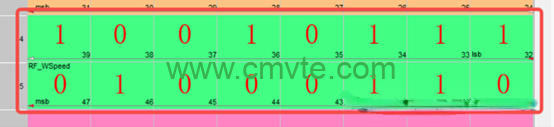
If you mistakenly read the Intel layout data 0x4697 (Byte4 = 0x97, Byte5 = 0x46) according to Motorola’s rules, you will get:
1001 0111 (Byte4) + 0100 0110 (Byte5) = 10010111 01000110 (binary) = 0x9746 (hexadecimal)! Signal value is totally wrong!
- Core conclusion & important extension
- The starting point is always the LSB:regardless of whether the format is Intel or Motorola, the starting position of a signal is always the LSB of the signal.
- When the signal does not span bytes, the physical bits of the two formats are stored in exactly the same location (in the example, both are 0 X 46, and both are in Bit0-Bit7 of the same byte). “Cross bytes or not” is the key! As shown in the figure below, even if the signal length is less than 8 bits (such as 4 bits), as long as it crosses the byte boundary, the arrangement of the two formats is completely different.

- DBC consistency:The byte order of all signals in a DBC database is usually set to Intel or Motorola, which is generally not mixed.
- Mandatory rules for LIN:Signals in the LIN database (LDF) are fixed in Intel format (little-endian) and cannot be changed.
- Practical value: Why do we need to understand byte order?Understanding the differences between Intel/Motorola formats is not an exercise in theory, but is critical in the following key scenarios:
- Encryption and decryption of simulation data:
- Scenario:Simulate security functions such as unlocking/locking the vehicle with a digital key. The original signal data (such as key, counter) needs to be encrypted before transmission on the bus, and the receiving end needs to be decrypted.
- Pain point:Encryption and decryption algorithms usually have strict requirements on the byte order and bit order of input data.
- Risk:If the byte order assumption used by the simulation tool or ECU during encryption and decryption does not match the actual DBC definition, the decryption will fail or the wrong data will be obtained, and the function cannot be realized!
- Solution:Accurately know the byte order of the signal in the DBC, and strictly correspond in the encryption/decryption code/configuration (little-endian Intel or big-endian Motorola).

2.Hil Simulation Modeling:
- Scenario:model the vehicle in a hardware-in-the-loop (hil) system to simulate ECU behavior or bus interference.
- Requirements:When the model needs to generate, parse, or modify can signal values (especially cross-byte signals).
- Key:When processing the signal value inside the model (bit operation, shift, mask), the physical bit layout (byte order) defined by DBC must be followed, otherwise the calculated signal value will be wrong!
Exploration Never Stops:
Uncovering the Deep Secrets of CAN Bus Communication
After reading this article, have you suddenly understood the “byte order war” between Intel and Motorola formats?
But this is only the first step in decoding the mysteries of the CAN bus!
Imagine: when the digital key you designed cannot unlock the vehicle due to byte order misalignment, or when the HIL simulation model outputs absurd values due to signal parsing errors – these seemingly small format differences are actually hidden “ghost faults” in in in vehicle communication.
Open your DBC file and use the Layout view of CANdb++to compare the cross byte case in the article, and personally verify the signal layout logic. You will find that those once dizzying bit matrices are now a controllable communication blueprint.


